
Comparison · 5 min read ·
SwarmPane vs Conductor: which fits you?
SwarmPane vs Conductor from both apps’ own pages: platforms, agents, worktrees, review and price, checked October 2026, with a note for BridgeMind users.
What is the difference between SwarmPane and Conductor?
Conductor is a Mac app, free for local work, that runs Claude Code, Codex, Cursor and OpenCode in parallel, each task in its own git worktree; SwarmPane is a paid desktop app for Mac, Windows and Linux that runs Claude Code, Codex and the other coding CLIs you use side by side in real terminals, up to 16 at once. If you are on a Mac and use those four agents, Conductor costs nothing to try; on Windows or Linux, or with agents such as Gemini CLI, GitHub Copilot, Grok Build, Devin or Hermes Agent, SwarmPane covers you.
We make SwarmPane, so weigh this accordingly. Conductor’s facts come from its docs, installation page and pricing, checked on October 24, 2026.
How do SwarmPane and Conductor compare?
Side by side, from each app’s own pages:
| Topic | SwarmPane | Conductor |
|---|---|---|
| Platforms | Mac (macOS 13 or later), Windows 10 and 11 (x64), Linux (x64) | macOS; “not available for Windows or Linux yet” |
| Agents | Claude Code, Codex, Antigravity CLI, Gemini CLI (with a Gemini API key), Cursor Agent, GitHub Copilot CLI, OpenCode, Grok Build, Kimi CLI, Aider, Droid, Devin and Hermes Agent (Devin and Hermes Agent on Mac and Windows for now) | Claude Code, Codex, Cursor, OpenCode |
| How an agent runs | In a real terminal pane, with the CLI’s own interface; Claude Code and Codex also in Agent and Chat modes | In a workspace with its own branch, files, terminal, diff and review path |
| Isolation | Own worktree per pane, when you turn it on | A git worktree per workspace |
| Review | Files, Git and the diff beside the panes; Undo for agents rewinds any step | Review the diff, open a pull request, merge and archive the workspace |
| Cloud | None: everything runs on your computer | Conductor Cloud, from the Pro plan |
| Price | $17, $29 or $50 a month, after a 7-day trial for $1; no free plan | Free for local workspaces; Pro $50 a month; Teams $60 per user a month |
| Also | Limit handoff and several accounts, workflows with approval steps, Web access (Labs), SwarmPane Voice (Mac, with Pro) | Multiplayer, live collaboration with up to 5 Pro users, the Conductor API and a mobile app, with Pro |
When is Conductor the better fit?
When you work on a Mac with Claude Code, Codex, Cursor or OpenCode and want a review flow that ends in a pull request. Local workspaces are free, so trying it costs nothing. Pro, at $50 a month, adds Conductor Cloud, which runs workspaces in hosted sandboxes, plus multiplayer, live collaboration with up to five Pro users, the Conductor API and a mobile app (pricing). SwarmPane has no cloud workspaces and no free plan.
When is SwarmPane the better fit?
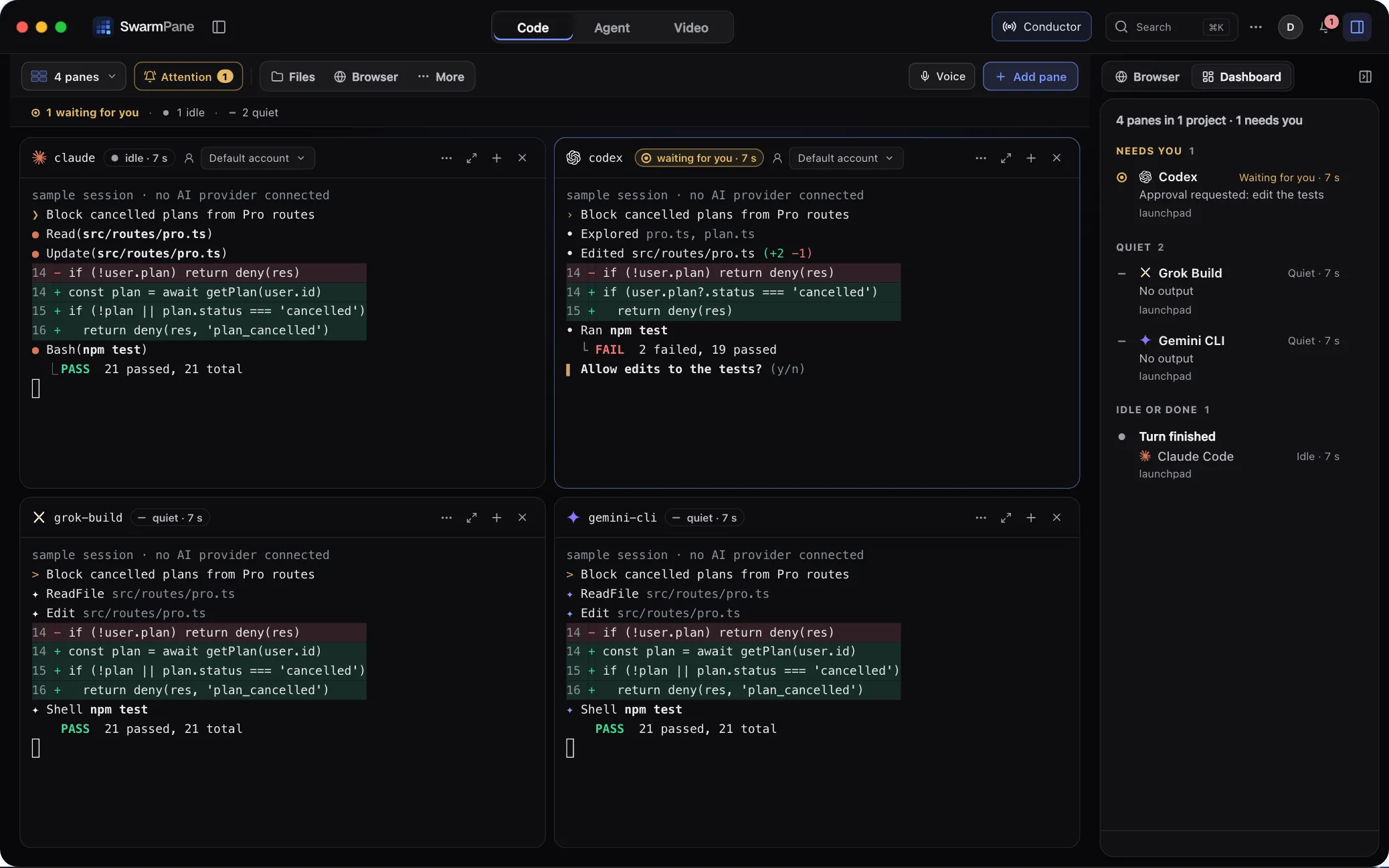
When you are on Windows or Linux, where Conductor isn’t available yet, or when your agents go beyond Conductor’s four. SwarmPane also runs Gemini CLI (with a Gemini API key), Antigravity CLI, GitHub Copilot, Grok Build, Kimi CLI, Aider, Droid, Devin and Hermes Agent, each in a real terminal with its own interface and your own sign-in. Devin and Hermes Agent need SwarmPane 1.3.13, out now on Mac and Windows; Linux follows shortly. Agent Grid shows up to 16 at once with a status on every pane, and Attention lists the ones waiting for you first.
It also handles the moments around the code. When Claude Code or Codex hits a usage limit, Limit handoff moves the work to your other account, or from one to the other, with a brief you edit first, and Accounts keeps several sign-ins side by side. Undo for agents rewinds any agent step. Workflow chains agents into up to 16 steps with approval steps, and Web access, in Labs, lets your agents search the web and read links.
Do both use git worktrees?
Yes. Conductor gives every workspace a git worktree, usually under ~/conductor/workspaces/<repo name>/<workspace name>, and its worktree docs warn that a new worktree doesn’t bring along untracked or gitignored files such as .env.local, so they suggest a setup script. In SwarmPane, Own worktree is a switch per pane, and a launch set can give each agent its own worktree and copy your .env files into them, never committed.
In both, a worktree separates files, not processes. Conductor’s docs put it plainly: workspace isolation is development isolation, not a security boundary, and agents still run with your user permissions.
Both also need the agent CLIs set up first. Conductor’s installation page asks for GitHub authentication in your terminal and a Claude Code login, a Codex login or a Cursor API key. SwarmPane uses the sign-in each CLI already has, and Settings → Agents shows the install command for any it can’t find.
Can you use both?
Yes. Both drive the CLIs you have already installed and signed in to, so on a Mac you can keep Conductor for tasks that should end in a pull request and use SwarmPane when you want many agents in one grid. One rule keeps it safe: never let two agents, from either app, work in the same folder at the same time. Give each one its own worktree and merge one branch at a time.
Looking for a BridgeMind alternative?
BridgeMind makes a desktop workspace for many agents too. The maker’s own Product Hunt launch for BridgeSpace 3 says it runs Claude, Codex, Gemini and Cursor side by side in one workspace, up to 16 agents in parallel, with a Bridge Agent that orchestrates them and a built-in browser and IDE (launch page). Its current platforms and prices are on bridgemind.ai; we leave them out because we could not confirm them from its own pages on October 24, 2026.
The questions to ask any of these apps are the ones in the table above: which systems it runs on, which agents it runs, whether each agent gets its own worktree, and what it costs. Our comparison of tools that run AI coding agents in parallel asks them of nine.
A note on names
SwarmPane has a feature called Jev Conductor (beta). It routes a goal to one of your agents and runs your checks, and it has nothing to do with Conductor (conductor.build).
Try SwarmPane
SwarmPane is Starter at $17 a month, Pro at $29 or Ultra at $50, and the app needs an active plan to open. Your Claude, ChatGPT, Cursor and other plans stay with their providers, which bill their own usage. Start with a 7-day trial for $1 and cancel before it ends if it is not for you.