Desktop apps · 7 min read ·
Claude Code GUI for Windows and Linux
Yes: Anthropic’s desktop app runs Claude Code on Windows and, in beta, on Ubuntu and Debian. Here are the other GUIs for both, checked October 2026.
Is there a Claude Code GUI for Windows or Linux?
Yes: Anthropic’s Claude desktop app has Claude Code built in, and it runs on Windows (x64 and ARM64) and, in beta, on Ubuntu 22.04 or later and Debian 12 or later. On other Linux distributions, such as Fedora or Arch, Anthropic points you to the CLI, and third-party desktop apps, SwarmPane among them, put Claude Code in a window on both systems.
Every fact below comes from each maker’s own docs or repository, checked on October 24, 2026: Anthropic’s desktop quickstart and Linux page for its app, and each project’s README for the rest. We make SwarmPane, so weigh that part accordingly.
What does Anthropic’s desktop app give you?
Claude Code lives in the app’s Code tab. The quickstart says the app includes Claude Code, so that tab needs neither Node.js nor the CLI, and that Claude Code requires a Pro, Max, Team or Enterprise plan. You pick a project folder and a model, and a session runs on your computer, in the cloud, over SSH or, on Windows, inside a WSL 2 distribution.
It is a real graphical interface, not a terminal in a frame. You review changes in a diff view, choose a permission mode (Auto, Manual, Accept edits or Plan), keep a terminal and a browser pane beside the conversation, and open parallel sessions from the sidebar, each in its own Git worktree if you want. Windows has an x64 installer and a separate ARM64 one.
On Linux the app is in beta. It needs Ubuntu 22.04 or later or Debian 12 or later, on x86_64 or arm64, and installs from Anthropic’s apt repository: add the signing key and the repository as the Linux page shows, then run sudo apt update && sudo apt install claude-desktop. It doesn’t update itself; new versions arrive with your system’s package updates. The same page lists what the beta lacks so far: Computer Use, dictation, and Fedora or RHEL, because only Debian-based distributions are supported today.
What about the VS Code extension?
If you already work in VS Code, Anthropic’s extension is the other official GUI: a panel inside the editor where you review and edit Claude’s plans before accepting them, @-mention files with line ranges, go back to past conversations and keep several open in tabs or windows. It needs VS Code 1.94.0 or later and a paid Claude plan or a Console account. The extension bundles a private copy of the CLI for its panel, which doesn’t put claude on your PATH, and the same page has an Install for Cursor link.
Which third-party apps run Claude Code on Windows and Linux?
Several apps run the Claude Code CLI that you install and sign in to yourself, so they use your own Claude plan. These state their platforms on their own pages:
Emdash, an Apache-2.0 app for running coding agents in parallel, each task in its own git worktree. Its README offers a Windows installer and a portable build, and AppImage, DEB and RPM packages for Linux on x64 and ARM64. It runs Claude Code beside Codex, Cursor, OpenCode, Amp, Devin and others, and says it doesn’t send your code or chats to Emdash servers.
Nimbalyst, a free, MIT-licensed visual workspace for Codex, Claude Code and other agents, for macOS, Windows and Linux, with sessions in git worktrees (README).
opcode, an AGPL-3.0 “GUI app and Toolkit for Claude Code” for sessions, custom agents, usage tracking and MCP servers. Its README lists Windows 10 or 11, macOS 11 or later and Ubuntu 20.04 or later, and says release executables will be published soon, so for now you build it from source.
CloudCLI, also called Claude Code UI, an AGPL-3.0 web and mobile interface for Claude Code, Cursor CLI, Codex and OpenCode. Start it with npx @cloudcli-ai/cloudcli (it needs Node.js 22 or later), then open http://localhost:3001 in a browser (README).
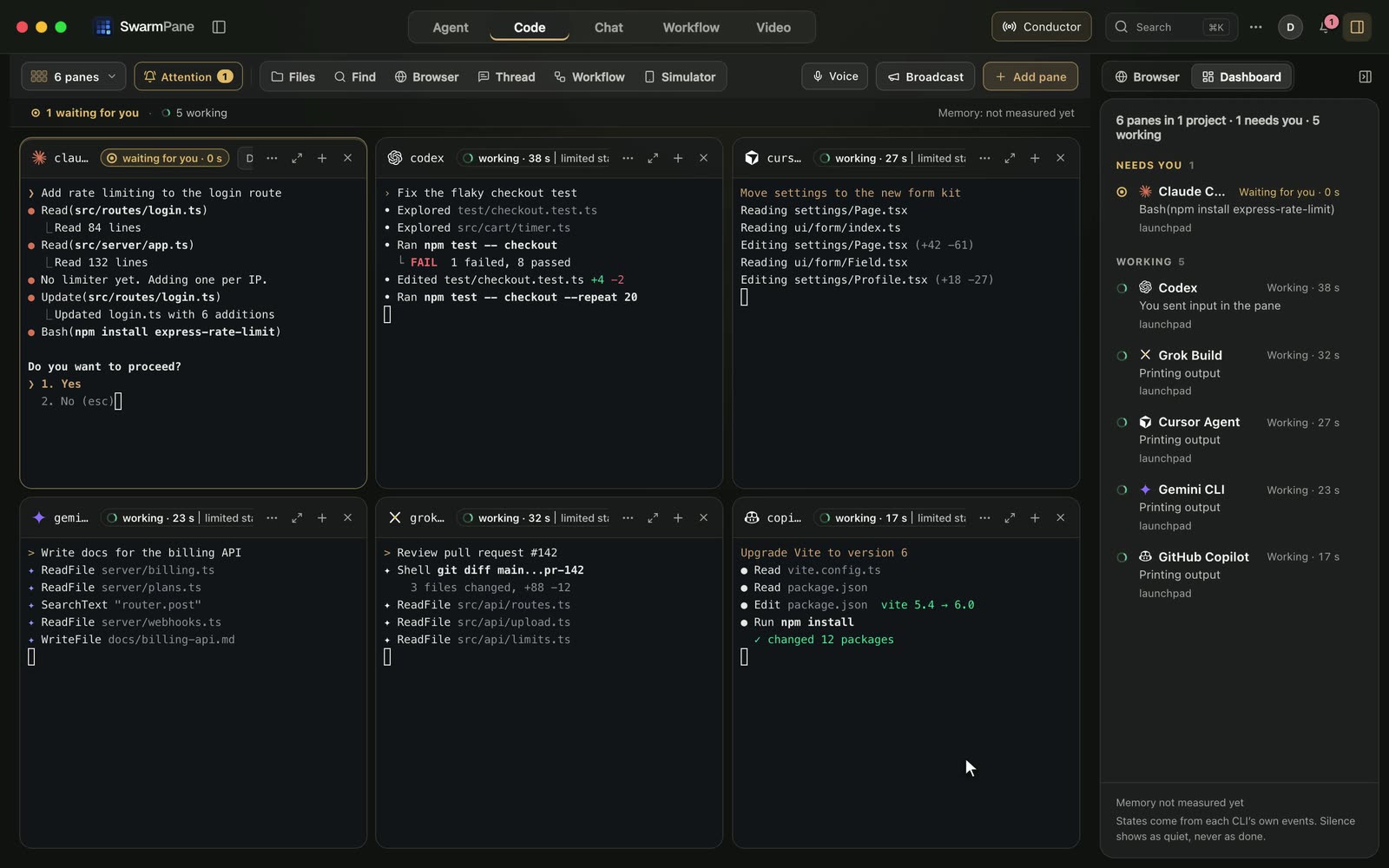
SwarmPane, which runs Claude Code and other coding CLIs side by side in real terminals, up to 16 at once, on Mac, Windows and Linux. More on what it does and doesn’t do below.
Two well-known apps don’t fit yet. Conductor says it is “not available for Windows or Linux yet” (install page), and Superset’s README calls its Linux AppImage experimental and says Windows is not yet available. Our list of Conductor alternatives for Windows and Linux goes further.
| App | Windows | Linux | What it is | License or price |
|---|---|---|---|---|
| Claude desktop app | x64 and ARM64 | Beta: Ubuntu 22.04+, Debian 12+ | Anthropic’s app, with Claude Code in its Code tab | Comes with a Pro, Max, Team or Enterprise plan |
| VS Code extension | Inside VS Code 1.94+ | Inside VS Code 1.94+ | A Claude Code panel in the editor | A paid Claude plan or a Console account |
| Emdash | Installer or portable build | AppImage, DEB or RPM, x64 and ARM64 | Parallel agents, a git worktree per task | Apache-2.0 |
| Nimbalyst | Yes | Yes | A visual workspace for Codex, Claude Code and more | Free, MIT |
| opcode | Windows 10 or 11, built from source | Ubuntu 20.04+, built from source | A GUI and toolkit for Claude Code | AGPL-3.0 |
| CloudCLI | In the browser | In the browser | A web and mobile UI, started with npx | AGPL-3.0 |
| SwarmPane | Windows 10 and 11, x64 | .deb (Ubuntu 22.04+, Debian 12+) or AppImage, x64 | Claude Code beside Codex, Gemini CLI and other CLIs, in real terminals, up to 16 at once | $17, $29 or $50 a month, after a 7-day trial for $1 |
Which one should you pick?
If Claude is your only agent and you are on Windows, Ubuntu or Debian, start with Anthropic’s app: it comes with the Claude plan you already pay for. If you spend the day in VS Code, the extension keeps Claude Code next to your files.
On Fedora, Arch or another distribution that isn’t Debian-based, Anthropic’s app isn’t an option yet, but the CLI is: Anthropic publishes apt, dnf and apk repositories for Debian, Ubuntu, Fedora, RHEL and Alpine. Any app that runs the CLI works on top of it, and SwarmPane’s AppImage runs on x64 distributions with glibc 2.34 or newer, such as Fedora 36 or later.
If Claude Code is one of several agents you run, choose an app made for several: Anthropic’s app runs Claude, while most of the apps above also run Codex, Cursor’s agent or others beside it. Our comparison of tools that run AI coding agents in parallel covers that choice.
Do you still need the terminal?
Not for everyday work in a GUI, but most third-party apps drive the CLI, so install it once. In PowerShell on Windows that is irm https://claude.ai/install.ps1 | iex, and on Linux or WSL it is curl -fsSL https://claude.ai/install.sh | bash, per Anthropic’s setup page. Then run claude in a project and sign in through the browser. On native Windows, Git for Windows is recommended but optional: without it, Claude Code uses PowerShell as its shell tool.
Our guide to running Claude Code on Windows has the full steps, the choice between native Windows and WSL, and fixes for the first errors people hit.
What SwarmPane does on Windows and Linux, and what it doesn’t
SwarmPane is a desktop app for Mac, Windows 10 and 11 (x64) and Linux (x64) that runs Claude Code and other coding CLIs side by side in real terminals, up to 16 at once. A Claude Code pane is Claude Code’s own interface, signed in with your own account; Claude Code and Codex also power SwarmPane’s Agent and Chat modes, which are conversation views. Agent Grid shows whether each agent is working, waiting for you or done, and Attention lists the sessions waiting for you first.
A launch set opens several agents in one click, each in its own worktree if you want. Undo for agents rewinds any agent step. When Claude Code hits a usage limit, Limit handoff carries the work to your other account, or to Codex, with a brief you edit first.
What to know first. The Windows installer isn’t code-signed yet, so Windows warns you before it runs (install steps); Git features need Git for Windows; and on Windows, a CLI that sends no status signal of its own shows “limited status”, because panes can’t read its exit code there (platforms). On Linux there is a .deb for Ubuntu 22.04 or later and Debian 12 or later, updated by hand for now, and an AppImage for other x64 distributions, which updates itself. Devin and Hermes Agent need SwarmPane 1.3.13, out now on Mac and Windows; Linux follows shortly. SwarmPane Voice is macOS only.
SwarmPane runs the Claude plan you already have, and Anthropic bills it separately. SwarmPane itself is Starter at $17 a month, Pro at $29 or Ultra at $50, and the app needs an active plan to open. Start with a 7-day trial for $1 and cancel before it ends if it is not for you.