Parallel agents · 5 min read ·
Best tools to run AI coding agents in parallel
The best tools to run several AI coding agents in parallel in 2026, from their own docs: Mac, Windows and Linux support, which agents, worktrees and price.
What is the best tool to run several AI coding agents in parallel?
The best tool for running several AI coding agents in parallel depends on your operating system and on which agents you use. On a Mac with Claude Code, Codex, Cursor or OpenCode, Conductor is free for local work; on Windows or Linux, or with a wider mix of agents, Emdash, Nimbalyst and SwarmPane run several vendors’ agents on all three systems, and so does the Zed editor.
We make SwarmPane, so weigh this accordingly. Every fact below comes from each tool’s own site, README or docs, checked on October 24, 2026. Nothing is ranked or benchmarked: these tools change every few weeks, and only your own repository can show which one works for you.
What should a parallel-agent tool do for you?
Three jobs matter more than the feature list:
Keep agents out of each other’s files. Each agent needs its own copy of the project, usually a git worktree. Without one, two agents rewrite the same files, and a failing test tells you nothing. Our worktree guide has the commands and the traps.
Show you who is waiting. With five agents running, the costly one is the agent that sat at a permission prompt for twenty minutes while you watched another.
Make review easy. Every agent ends with a diff you have to read before it merges, so the review view matters as much as the launch button.
One limit applies to all of them: a worktree separates files, not processes. Conductor’s docs call workspace isolation “development isolation, not a security boundary”, and Superset’s README says worktrees don’t sandbox processes or prevent merge conflicts. Agents still run with your user’s permissions.
How do the tools compare?
The table sets out what each tool’s own pages say. “Not stated” means we could not find it there, not that the tool lacks it.
| Tool | Platforms | Agents | Isolation | Price or license |
|---|---|---|---|---|
| SwarmPane | Mac (Apple silicon and Intel), Windows and Linux (x64) | Claude Code, Codex, Gemini CLI, Cursor Agent, Copilot, Devin, Hermes Agent and more (Devin and Hermes Agent on Mac and Windows for now) | Own worktree per pane, when you turn it on | $17, $29 or $50 a month, after a 7-day trial for $1 |
| Conductor | Mac; not on Windows or Linux yet | Claude Code, Codex, Cursor, OpenCode | A git worktree per workspace | Free for local workspaces; Pro, $50 a month, adds the cloud |
| Superset | Mac; an experimental Linux AppImage; no Windows yet | Claude Code, Codex, OpenCode, Cursor Agent or another CLI agent | A git worktree per task | Desktop app free; Elastic License 2.0 |
| Emdash | Mac, Windows and Linux (x64 and ARM64) | Claude Code, Codex, Cursor, OpenCode, Amp, Devin, Qwen Code, Droid, Copilot | A git worktree per task | Apache-2.0 |
| Nimbalyst | Mac, Windows and Linux | Codex and Claude Code; OpenCode and Copilot in alpha | A git worktree per session | Free, MIT |
| Claude Squad | A terminal app on tmux: Mac and Linux, or WSL | Claude Code, Codex, Gemini, Aider | A git worktree per session | Free, AGPL-3.0 |
| amux | Mac and Linux | Claude Code, Codex, Gemini CLI, OpenCode, Ollama | Not stated | Runs on your machine; amux Cloud from $39 a month |
| Sculptor | Mac (Apple silicon) and Linux (x64, ARM64) | Claude Code, Pi, other terminal agents | An isolated copy per workspace | MIT; a research preview |
| Zed | Mac (Apple silicon), Windows and Linux | Zed’s own agent, plus Claude, Codex, OpenCode, Copilot, Cursor, Gemini CLI and more | A worktree when you start one | Zed doesn’t charge for external agents |
Which tools run agents in parallel on Windows?
Natively, four from the table: Emdash (an installer or a portable build), Nimbalyst, Zed and SwarmPane (Windows 10 and 11, x64). Claude Squad is built on tmux, whose install page covers Linux and macOS only, so on Windows it means WSL, and amux says it runs on macOS and Linux. Conductor says it is not available for Windows or Linux yet (install page), Superset says Windows is not yet available, and Sculptor lists no Windows download.
Each vendor’s own app also runs parallel sessions of its own agent on Windows: Claude’s desktop app, with a worktree per session if you want, the ChatGPT desktop app for Codex, with parallel chats and worktrees, and Cursor’s Agents Window. Each runs its own vendor’s agent, so a mix of agents still means several windows. For Claude Code alone, our guide to Claude Code GUIs for Windows and Linux compares the options.
Which tools run agents in parallel on Linux?
Emdash (AppImage, DEB and RPM, on x64 and ARM64), Nimbalyst, Sculptor (x64 and ARM64), Zed, Claude Squad and amux run on Linux, and Superset has an experimental AppImage. Anthropic’s desktop app is in beta for Ubuntu and Debian.
SwarmPane’s Linux build is x64, for glibc 2.34 or newer: a .deb for Ubuntu 22.04 or later and Debian 12 or later, and an AppImage for other distributions, such as Fedora 36 or later (install guide). Devin and Hermes Agent need SwarmPane 1.3.13, out now on Mac and Windows; Linux follows shortly. Lid-closed mode, in Labs, keeps a Linux or Mac laptop awake with the lid closed only while an agent works.
Do you need a tool at all?
For two or three agents, maybe not. git worktree add ../app-auth -b auth gives an agent its own copy, and the CLIs help: Claude Code has claude --worktree <name>, the Codex CLI has a /worktree command, and Hermes Agent has hermes -w. tmux puts every terminal on one screen.
What you don’t get by hand is one list of which agent is waiting for you, across vendors. Budget for usage too: Anthropic’s agent view docs say running ten agents in parallel uses quota roughly ten times as fast as running one. Our guide to running several Claude Code sessions covers the manual route and how many sessions one person can really review.
Where SwarmPane fits, and where it doesn’t
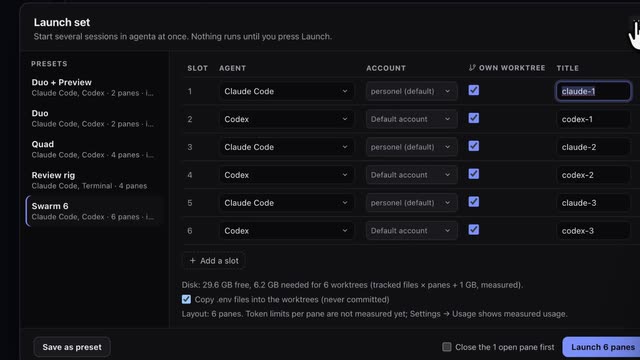
SwarmPane runs the coding CLIs you already use, with your own sign-ins, side by side in real terminals: up to 16 at once, across Claude Code, Codex, Antigravity CLI, Gemini CLI (with a Gemini API key), Cursor Agent, GitHub Copilot CLI, OpenCode, Grok Build, Kimi CLI, Aider, Droid, Devin and Hermes Agent. Agent Grid shows which agent is working, waiting for you or done, Attention puts the ones that need you first, and a launch set opens several at once, each in its own worktree if you want.
When a Claude Code or Codex account hits its limit, Limit handoff and Accounts move the work to your other account, or from one to the other, with a brief you edit first. Undo for agents rewinds any agent step, Workflow chains agents into up to 16 steps with approval steps, and Web access, in Labs, lets your agents search the web and read links.
What it doesn’t do: there are no cloud workspaces or hosted agents, because everything runs on your computer; there is no free plan, only a trial; the app is closed source; SwarmPane Voice is macOS only; and the Windows installer isn’t code-signed yet. Each coding provider bills its own usage.
SwarmPane is Starter at $17 a month, Pro at $29 or Ultra at $50, and the app needs an active plan to open. Start with a 7-day trial for $1, once per account, and cancel before it ends if it is not for you.